AI Page Summarizer
Manifest V3 extension with a security-first Gemini API architecture.
- Chrome Extension
- Manifest V3
- JavaScript
- Gemini API
- Service Worker
- Chrome Storage API
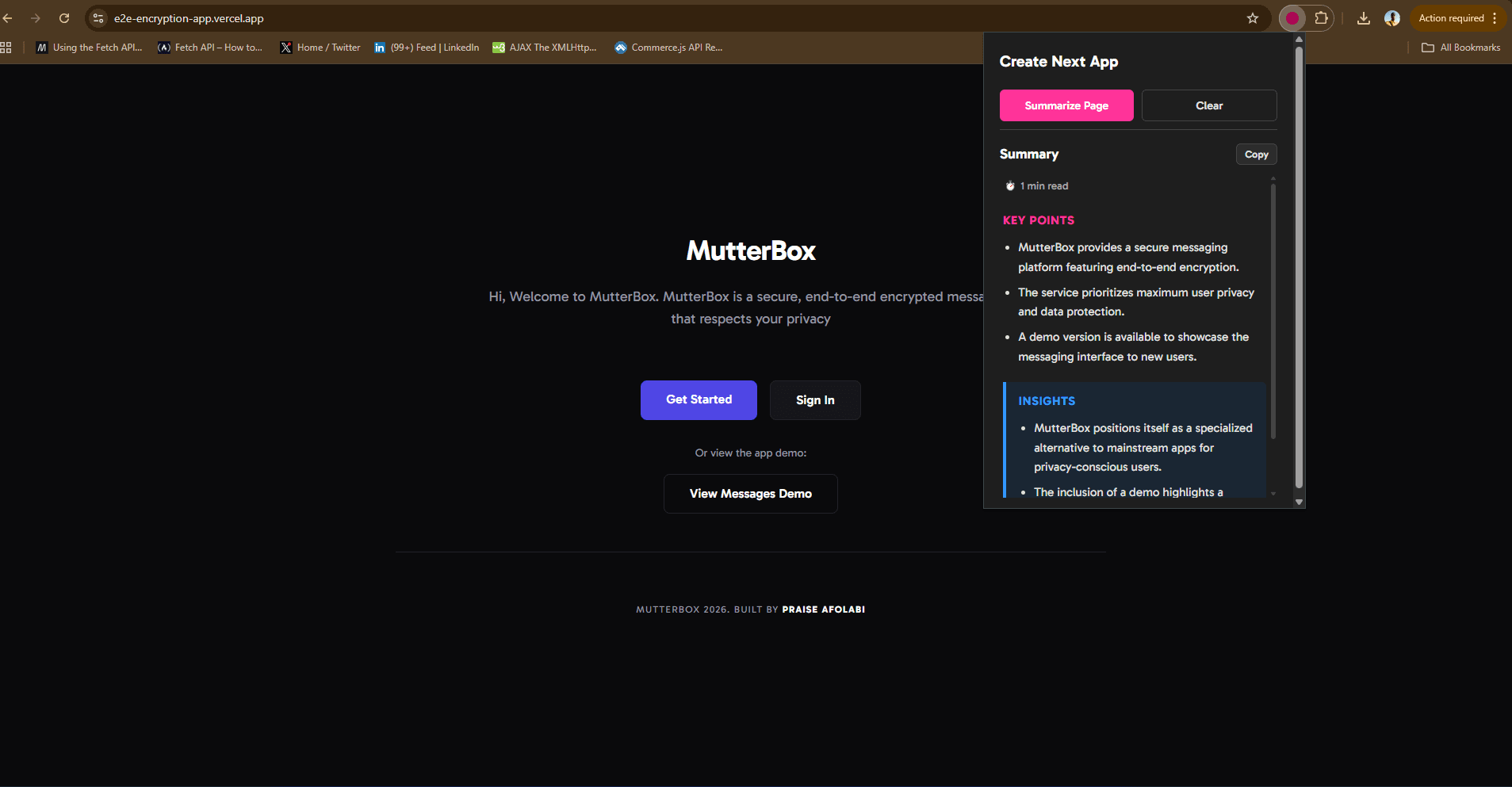
Overview
A Manifest V3 Chrome extension that extracts readable content from any webpage and generates structured AI summaries via the Gemini API. The API key lives exclusively in the background service worker — content scripts and the popup never receive it — with bullet-point summaries, key insights, and a 24-hour URL-based cache to avoid redundant requests.
Problem
Browser extensions often handle API keys poorly — hardcoded in source, passed through `postMessage`, or stored where content scripts can read them. Any page you visit runs in the same extension context as your secrets. I wanted a summarizer where the key never leaves the service worker, page extraction stays isolated in content scripts, and the popup is a thin UI that requests work without touching credentials or network calls directly.
Approach
I split the extension into three layers with strict message passing. Content scripts extract and clean page text, then send it to the background worker. The service worker owns the Gemini API key (stored via Chrome Storage), checks a URL-keyed cache, calls the API when needed, and returns structured results. The popup only renders state and dispatches actions — it never imports the key or calls fetch against Gemini itself.
How a Summary Flows
User opens the popup on a tab — the popup sends a `SUMMARIZE` message to the background service worker.
The service worker reads the active tab URL and checks `chrome.storage.local` for a cached summary younger than 24 hours.
On cache miss, the worker injects or messages a content script to extract main article text from the DOM.
Cleaned text is sent to the Gemini API from the service worker — the only context that holds the API key.
The worker parses the response into bullet points and key insights, stores the result keyed by URL + timestamp, and replies to the popup.
The popup renders the summary UI — loading, error, and success states — without ever receiving the key.
Settings flow writes the API key to storage through the background worker; the popup sends the value once, the worker persists it.
Code Highlight
chrome.runtime.onMessage.addListener((message, sender, sendResponse) => {
  if (message.type === "SUMMARIZE") {
    handleSummarize(message.tabId, message.url)
      .then(sendResponse)
      .catch((err) => sendResponse({ error: err.message }));
    return true; // keep channel open for async response
  }

  if (message.type === "SAVE_API_KEY") {
    chrome.storage.local.set({ geminiApiKey: message.key })
      .then(() => sendResponse({ ok: true }));
    return true;
  }
});

async function handleSummarize(tabId, url) {
  const cached = await getCachedSummary(url);
  if (cached) return cached;

  const pageText = await extractPageText(tabId);
  const apiKey = await getApiKey();
  const summary = await callGemini(apiKey, pageText);

  await cacheSummary(url, summary);
  return summary;
}
Key Decisions
API key placement
Choice: Background service worker only — never in popup or content scripts
Why: Content scripts run in the context of whatever page is open. If the key lived there or in the popup, a malicious page could potentially probe for it. The service worker is isolated from page DOM and is the correct trust boundary in Manifest V3.
Platform target
Choice: Manifest V3 with a service worker background
Why: MV3 is the current Chrome extension standard — no persistent background pages. The service worker wakes on messages, handles the API call, and sleeps. Designing for MV3 from the start avoids a migration later.
Communication pattern
Choice: Async `chrome.runtime.sendMessage` with long-lived responses
Why: Summarization involves DOM extraction plus a network round-trip. Returning `true` from the listener keeps the message channel open for async `sendResponse`, so the popup can show a loading state without blocking the UI thread.
Caching strategy
Choice: 24-hour URL-keyed cache in `chrome.storage.local`
Why: Re-summarizing the same article during a reading session wastes API quota and adds latency. Keying by URL with a TTL gives instant repeat visits while still refreshing stale summaries overnight.
Content extraction
Choice: Content script DOM pass — main text heuristics, strip nav/ads
Why: Sending raw `innerHTML` to an LLM is noisy and expensive. A content script that targets article-like containers and strips boilerplate produces cleaner input and more focused summaries.
Output shape
Choice: Structured response — bullet summary + key insights
Why: A wall of prose is hard to scan in a narrow popup. Prompting Gemini for a fixed JSON-like structure (bullets + insights) keeps the UI predictable and easy to render without parsing free-form markdown.
Outcomes
- API key stored and used exclusively in the background service worker — popup and content scripts never import it
- Structured summaries with bullet points and key insights rendered in a compact popup UI
- 24-hour URL-based cache reduces redundant Gemini calls on repeat visits
- Manifest V3 architecture — service worker, message passing, Chrome Storage API
- Content extraction pipeline strips boilerplate before sending text to the model
Limitations & Trade-offs
Documenting what the system does not protect against is as important as what it does.
- Requires users to supply their own Gemini API key — no hosted backend to proxy requests.
- Content extraction heuristics work best on article-style pages; SPAs with heavy client rendering may return thin or empty text.
- Cache is keyed by URL only — the same page with materially different content within 24 hours won't re-summarize until the cache expires.
- Chrome-only — Manifest V3 service worker APIs differ from Firefox's extension model; porting needs a separate pass.
- Extension popup trust model — users still trust the installed bundle. A compromised build could exfiltrate keys regardless of architecture.
What I Learned
- In extensions, draw trust boundaries between contexts first — service worker, content script, popup — then decide what each layer is allowed to know.
- Manifest V3 service workers are ephemeral. Any in-memory state disappears when the worker sleeps — persist cache and keys in `chrome.storage`, not module-level variables alone.
- Async message passing needs explicit `return true` in the listener; forgetting it is the most common reason popup requests silently hang.
- Structured LLM output (bullets + insights) is easier to render reliably than parsing markdown in a 360px-wide popup.
Build Notes
Building a Manifest V3 extension with a security-first API key architecture — why the service worker is the only place secrets live, async message passing patterns, and caching summaries by URL.
- Manifest V3
- Service workers
- Extension security
- Gemini API
- Chrome Storage
Video walkthrough coming soon — this page will host a recording documenting how this project was built, the tradeoffs involved, and what broke along the way.